 AnswerLion
verify sitemap xml
Verify Sitemap XML: Checks, Steps and Fixes for 2026
Learn how to verify sitemap XML for AI crawlers and search engines: validate structure, check URL quality and lastmod accuracy.
Published · Updated · By AnswerLion

Your sitemap opens in the browser, the SEO plugin reports success, and the latest release is live. Yet a crawl reveals old product URLs, pages marked noindex, and modification dates that change every time the site rebuilds. The file exists, but it doesn't accurately represent the pages you want discovered.
To verify sitemap XML properly, test both the file and its contents. Structural validation proves that a parser can read it. URL-quality checks and accurate lastmod values make it a useful inventory of your canonical, indexable pages.
The Sitemap Checks That Decide Validity
Run this pass-or-fail table against the live sitemap, saving the response body so you can inspect exactly what crawlers receive.
Required sitemap checks and pass criteria
| Check | Requirement | How to Test | Failure Signal |
|---|---|---|---|
| Encoding | UTF-8 | Inspect the declared encoding in the file header | Garbled characters or parser errors |
| Root element | urlset with the Sitemap protocol namespace |
Read the first element of the file | Parser rejects the file or reads no URLs |
| URL entries | One url element per page, each with a loc child |
Count url elements against loc elements |
Entries without loc, or empty entries |
| Escaping | Ampersands and other special characters escaped | Run the file through an XML validator | Malformed XML error at a specific line |
| Host | All URLs on a single host | Group loc values by hostname |
Mixed domains or subdomains in one file |
| Per-file limit | Maximum 50,000 URLs and 50 MB uncompressed | Count entries and measure decompressed size | File too large, must be split |
| Index limit | Maximum 50,000 sitemap references per index | Count sitemap entries in the index |
Index contents truncated or ignored |
lastmod format |
ISO 8601 date or datetime for each populated value | Parse every lastmod value |
Freshness data unreadable for crawlers |
The Sitemaps protocol specifies the encoding, namespace, required elements, escaping, single-host rule, and the 50,000-entry and 50 MB limits shown above. Treat lastmod as an optional field with strict formatting when present, not a reason to invent a date for every URL.
Inspect the actual markup
A page sitemap needs a <urlset> root. A sitemap index uses <sitemapindex> instead, so identify the file type before deciding that its root is wrong. Use a namespace-aware parser when counting elements, otherwise your script may report an empty inventory from a valid file.
Within <loc>, write a query string such as color=red&size=M as color=red&size=M. Escape the XML representation without changing the destination URL itself.
Practical rule: A structural pass means the file is readable, not that its pages deserve inclusion.
Mark every row against the public response, not the repository copy. Build transformations, caching, and CDN handling can change what reaches production.
How to Run a Structure and Size Check
Fetch first, then parse and measure the saved response. This separates a hosting problem from a generator problem and gives your developer a reproducible artifact.
The workflow below keeps those checks in a useful order.
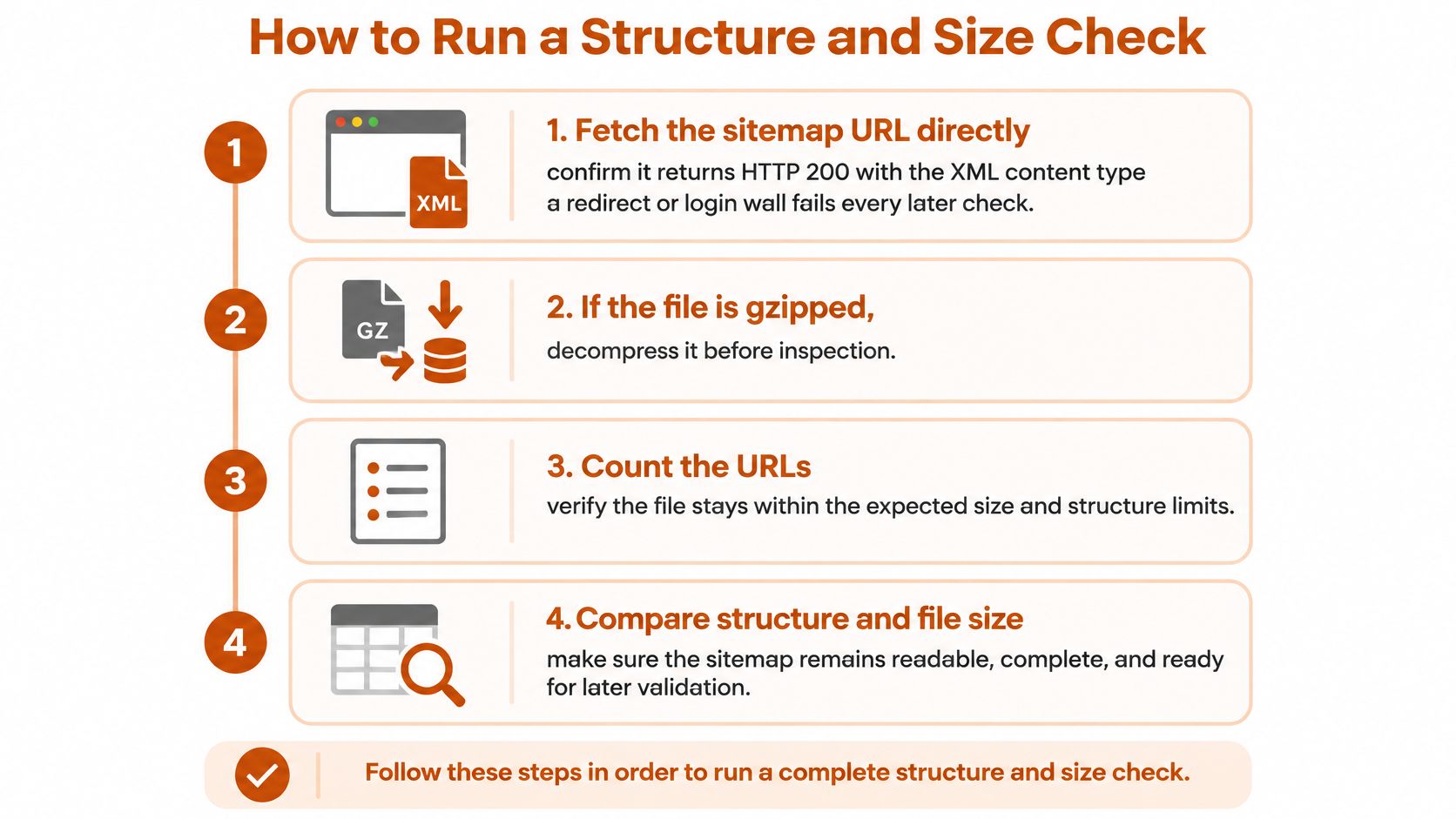
Fetch the production URL directly. Use
curlor your browser's Network panel to inspect the response, aiming for HTTP 200 and an XML content type. A staging file that validates doesn't help when production serves a redirect, login wall, or not-found page.Decompress before measuring. Gzip reduces transfer size, not the permitted underlying file size: Google's sitemap guidance sets the ceiling at 50,000 URLs or 50 MB (52,428,800 bytes) uncompressed, whichever comes first, and applies the same size ceiling to indexes with up to 50,000 sitemap references. The common slip is measuring the compressed download rather than its expanded contents.
Validate XML syntax. Run the saved response through an XML parser such as
xmllint, recording the exact error location. An unescaped ampersand or truncated closing element can prevent the parser from reading the complete inventory.Count entries and locations. Compare page-level
<url>entries with their direct<loc>children, and flag missing or empty locations. Don't count every<loc>indiscriminately, because extension elements can contain additional locations.Split before the file reaches its ceiling. Generate stable child files and a sitemap index, leaving operational headroom for growth. Splitting only by URL count misses files that reach the byte limit first.
Reconcile the index with published children. Confirm that every intended child appears and every reference resolves. A rebuild can delete an old child while leaving its reference in a cached index.
Repeat the checks for every child. Fetch, decompress, parse, and count each referenced file rather than assuming the index proves its children are healthy. Otherwise, a broken product sitemap can remain hidden behind a perfectly readable index.
Make the output reproducible
Save the response headers, parse result, decompressed size, and inventory count together. A clean run has a successful response for every file, no parsing errors, and counts that reconcile with the intended page inventory.
For larger inventories, choose a crawler with sitemap imports and exportable diagnostics. Our comparison of all-in-one SEO software can help you evaluate the reporting workflow, but keep the saved production response as your debugging reference.
Checking Whether Listed URLs Can Be Indexed
A sitemap can validate perfectly while directing crawlers toward redirects, duplicates, and excluded pages. The important test is whether each listed URL is itself the intended indexing candidate, not whether following its redirects eventually reaches a working page.
Use a crawl checklist that connects each failure to a specific correction.
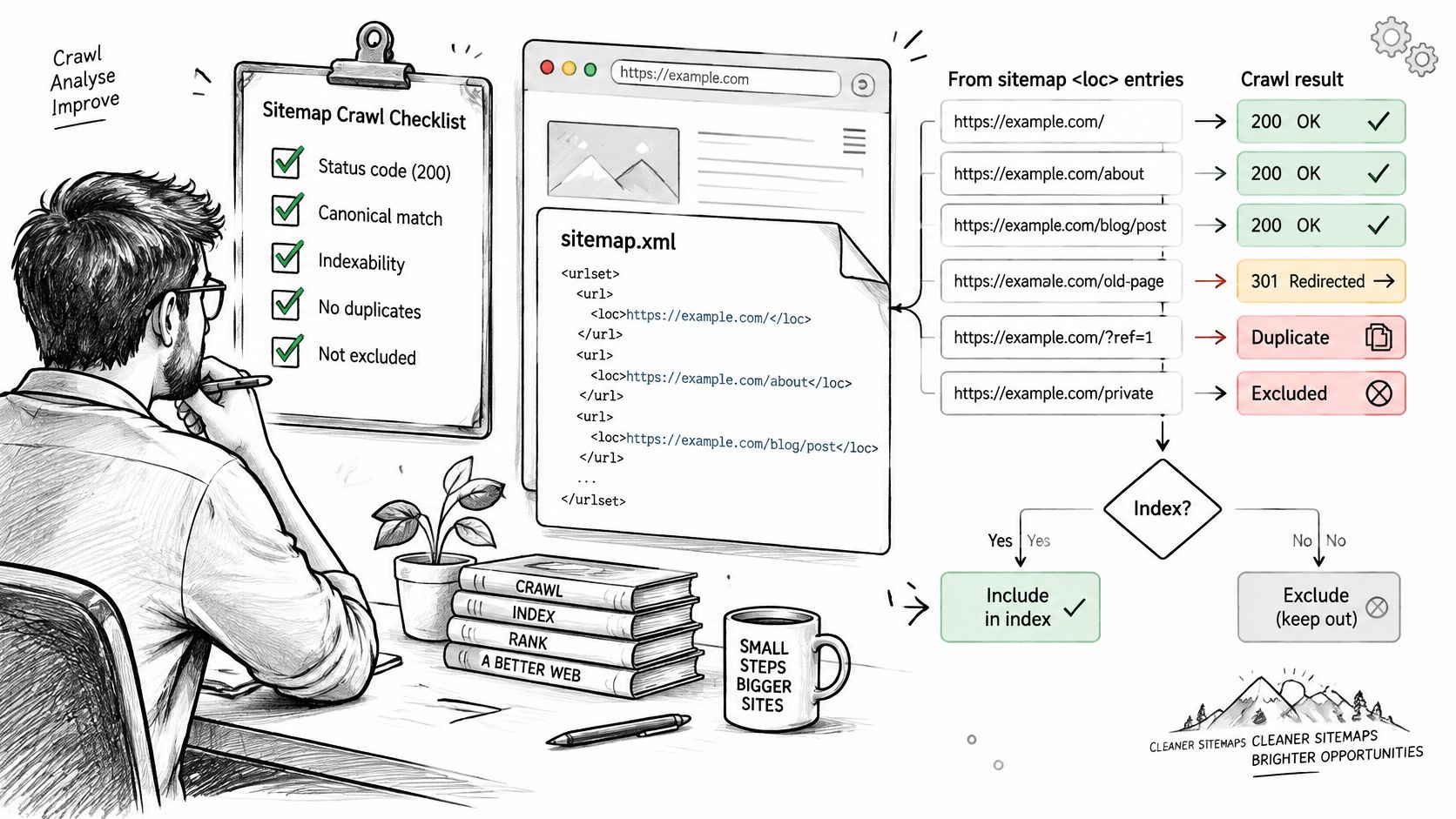
URL quality checks and fixes
| Check | Pass Criterion | Fix |
|---|---|---|
| Status codes | Every listed URL returns 200 directly as the final destination | Replace redirects with eligible final URLs; remove missing or gone pages |
| Canonicals | The listed URL is its own canonical | List the canonical version or drop the page |
| Robots and meta | Not blocked by robots.txt and not set to noindex | Remove intentionally excluded URLs; correct accidental exclusions |
| Protocol and host | One protocol and one host across the file | Keep only the HTTPS canonical version of each page |
| Low-value pages | Substantive, indexable pages only | Remove filtered facet URLs, thin pages, and soft-deleted products |
Crawl the submitted URLs, not just the website
Import every <loc> into Screaming Frog SEO Spider or Sitebulb. Export the original response code, final destination, canonical, robots status, meta robots, and X-Robots-Tag directives.
For status codes, replace 301 and 302 entries with their eligible final destinations; remove 404 and 410 entries unless a genuine replacement exists. For canonicals, resolve the editorial decision first: either the listed page should be canonical, or the sitemap should contain its canonical alternative.
Check robots restrictions and noindex separately. If exclusion is intentional, remove the URL. If it's accidental, correct the directive and retest before including the page.
Keep HTTP and HTTPS variants from becoming separate inventory entries. Then review low-value templates manually: a successful response alone doesn't make an empty category or soft-deleted product useful.
For a visual companion to the crawl review, use this walkthrough.
Check access for the crawlers you want
Review the applicable robots.txt groups for GPTBot, ClaudeBot, and PerplexityBot according to your visibility policy. Sitemap inclusion doesn't override a crawler-specific block or prove that a particular bot will use the sitemap. Our guide to generating a robots.txt file helps you align access rules with intended public content.
For new pages, set the quality-error target to zero. For legacy inventory, track a falling error rate and fix the largest failing group first.
At AnswerLion, we don't need website access for the audit. For content and technical fixes, we either make changes with access or hand finished changes to your developer.
Testing Whether lastmod Dates Are Accurate
A sitemap can pass XML validation and still lie about freshness. Stamping every URL with the file's generation time is a convenient automation shortcut, but it tells crawlers that a rebuild is a content update. Use ISO 8601 dates, and reserve lastmod for pages whose content changed.
Stale or missing lastmod values are common enough that presence proves little. A complete column of dates can be worse than an incomplete one if those dates are invented.
Compare dates with evidence of change
Join the sitemap export to CMS revision history by canonical URL or content identifier. Compare each lastmod against meaningful page changes, then use the HTTP Last-Modified header and structured data dateModified as supporting evidence.
Neither field is authoritative on its own. A server can report deployment time in its header. Structured data can inherit the same faulty build timestamp as the sitemap. I treat agreement between those sources as a reason to trust the date, and disagreement as a reason to inspect the page history.
lastmod red flags and what to do about each
| Pattern | Why It Misleads Crawlers | Fix |
|---|---|---|
| Future date | Signals a value that cannot be correct | Correct the date to the last real content change |
| One timestamp on thousands of URLs | Suggests build-time stamping rather than page-level updates | Use each page's own revision date; verify legitimate bulk changes |
| Invalid calendar date | Supplies an unreadable freshness value | Reformat to ISO 8601 and check the date |
| Date changes, content does not | Repeatedly signals updates that didn't happen | Update lastmod only on meaningful content change |
Missing lastmod on changed pages |
Omits freshness information for recently updated URLs | Populate from reliable CMS revision history |
A shared timestamp is not automatically wrong. A genuine catalog-wide correction can update thousands of pages at once. Compare the changed fields before rejecting the batch.
A trustworthy date is more useful than a complete column of invented dates.
Define meaningful updates
Changes to service details, product availability, substantive copy, or important page information can justify a new modification date. A deployment, analytics change, or rotating footer timestamp should not rewrite every entry.
Unreliable dates waste crawl attention and make freshness metadata less useful. They do not establish that crawlers will deprioritize an entire sitemap. Set lastmod when meaningful content changes, and omit it when the accurate date is unknown. A missing date is easier to defend than a false one. That matters most when the sitemap is otherwise valid, because the remaining risk sits in the URLs and dates rather than the XML.
Monitoring Sitemaps After Every Release
Treat the sitemap as a monitored data feed, with a known source inventory, an owner, and checks that run when production changes. Compare it against canonical URLs on every deployment, with a daily reconciliation for frequently changing sites.
Google Search Console's sitemap documentation distinguishes problems such as gzip decompression errors, invalid XML attributes, oversized files, and excessive index references. Your alerts should preserve that distinction instead of reporting a generic invalid-sitemap message.
Use a workflow that connects the published feed to deployment and inventory checks.
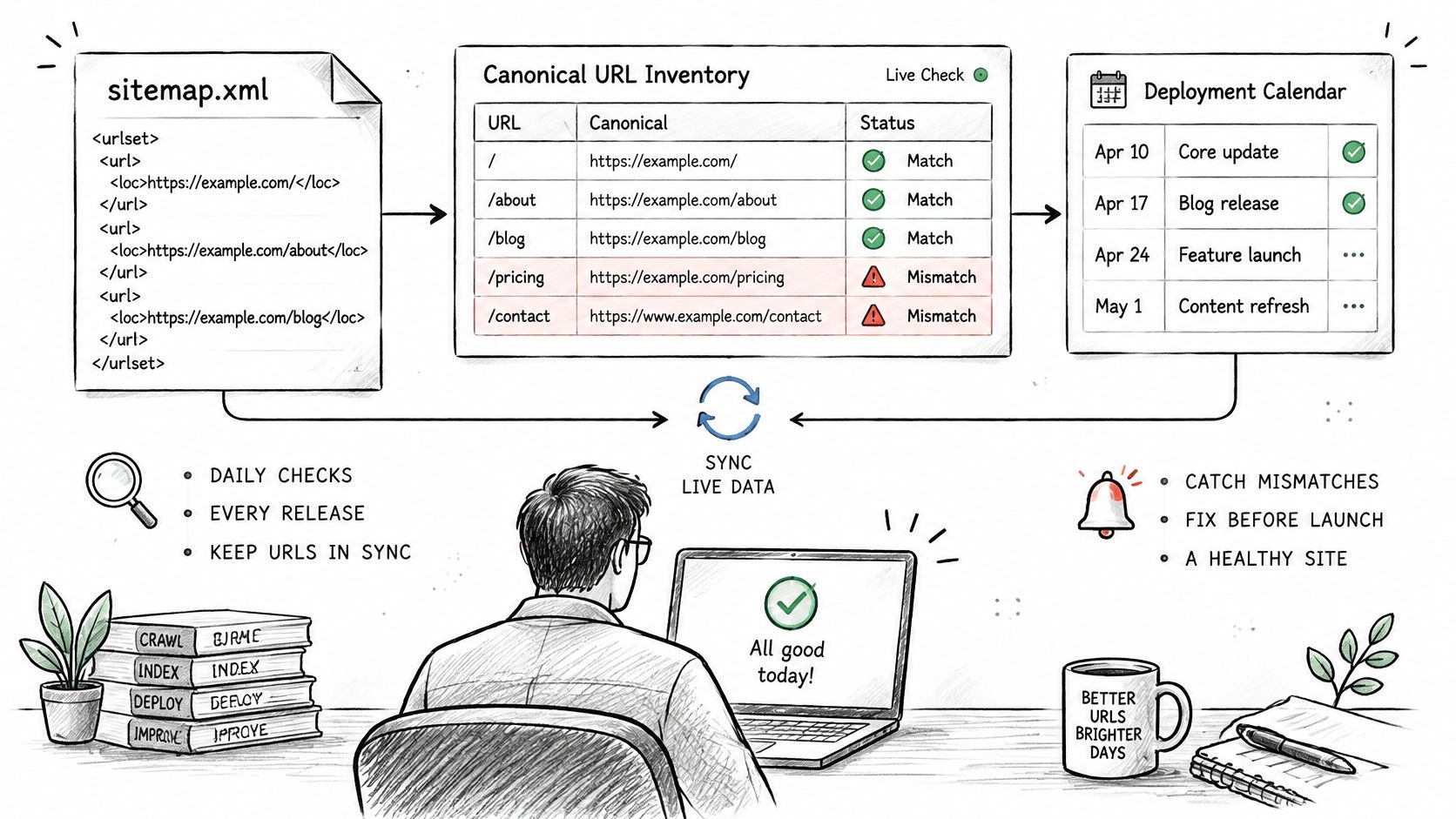
Report changes that need an owner
Your monitoring export should include:
- Inventory reconciliation: Total URLs, missing intended pages, unexpected additions, and duplicates.
- URL eligibility: Status-code distribution, canonical mismatches, blocked pages, and noindex directives.
- Consistency: Host and protocol differences, including unexpected staging references.
- Freshness: Missing values on changed pages, invalid dates, and unexplained timestamp churn.
Store the failing URLs alongside the summary. A marketing director needs the trend and business impact; a developer needs the file, failing rule, affected entries, and deployment identifier.
Separate transport, syntax, structural-limit, and URL-quality alerts. Route delivery problems to the hosting or platform owner, generator defects to engineering, and inclusion decisions to SEO or content operations.
Gate the release without hiding healthy inventory
Block sitemap publication when a critical transport or structural error exists. For URL-quality problems, quarantine the affected batch when it exceeds the agreed threshold rather than replacing a healthy published inventory with a defective one.
Release safeguard: Keep the last known-good sitemap available while the replacement fails validation.
Review legacy trends weekly, test new pages on each deployment, and name the person responsible for acknowledging alerts. For broader machine-readable readiness, maintain your business summary through an llms.txt generator workflow, while keeping sitemap eligibility and crawler-access checks independent.
Confirm the Sitemap Before You Publish
Use a publish-or-hold decision, not a general impression that the sitemap looks fine. A browser preview, a successful plugin message, and a locally valid XML file each answer only part of the production question.
Publish when the structure checks pass on the live response, every child file is accessible and parses cleanly, and the inventory contains the intended canonical pages. Where lastmod is present, its value should reflect a real content change.
Use this validation flow to make the decision explicit.
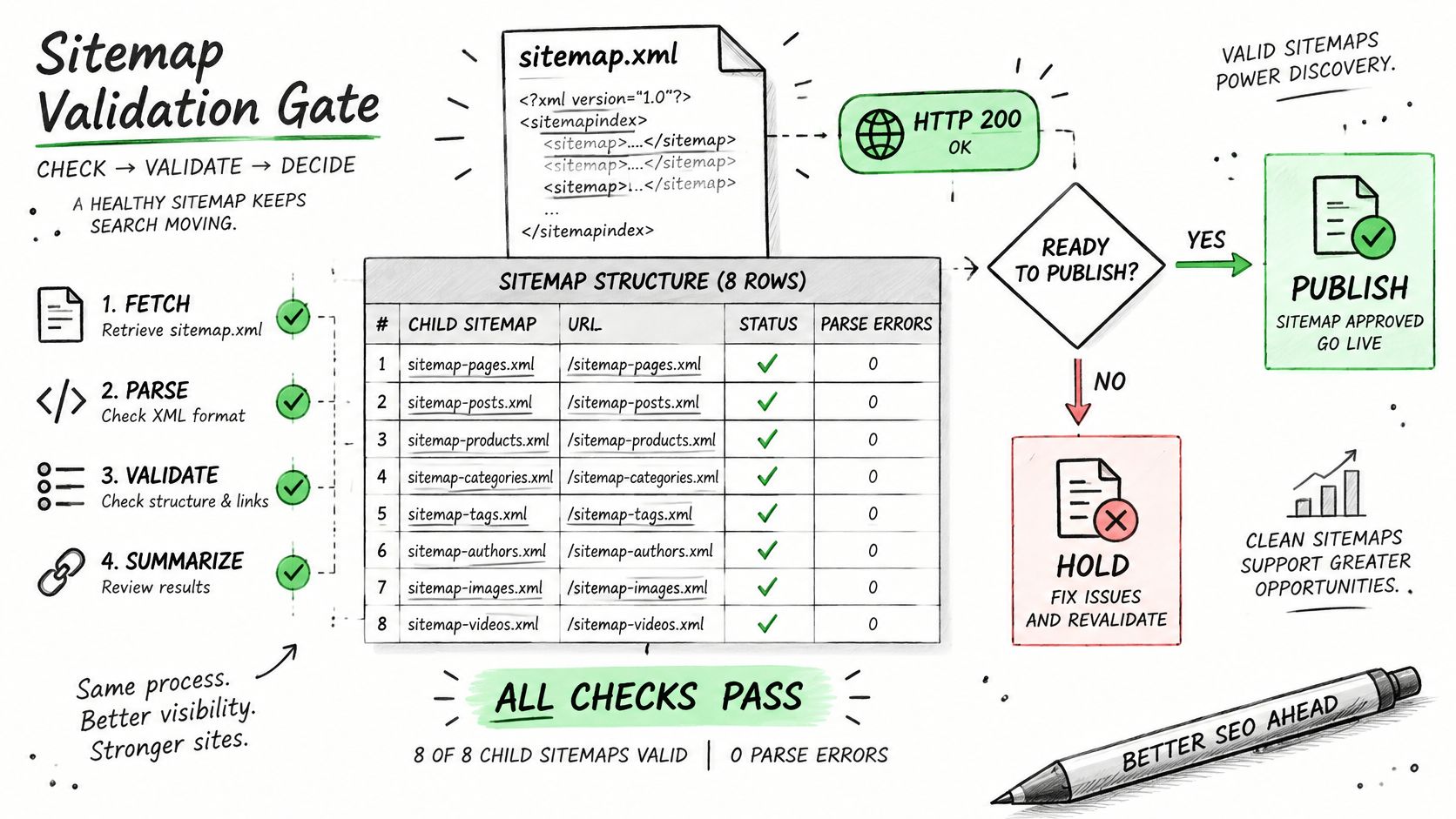
Publish when the evidence agrees
The release record should demonstrate these outcomes:
- Readable files: Every index and child file passes its applicable format, scope, and size checks.
- Eligible destinations: No listed URLs redirect, return missing-page responses, or carry intentional crawling or indexing exclusions.
- Accurate metadata: Populated modification dates agree with meaningful updates, and unknown dates aren't fabricated.
- Complete inventory: Unique sitemap URLs reconcile with the intended canonical page list, including newly published content.
- Operational ownership: Alerts reach named owners, and the release record includes the saved responses and failing-row export.
Reconcile the actual URL sets, not just their totals. Two inventories can contain the same number of entries while including different pages. Compare intended pages missing from the sitemap separately from unexpected sitemap additions.
A missing regional service page needs a different fix from an obsolete filter URL. Assign the former to the publication or generator owner and the latter to the person responsible for inclusion rules.
Hold critical failures and route the work
Hold sitemap publication when a critical check fails. Fix transport and parsing problems before reviewing individual page batches, because the crawler needs a readable file before it can use the inventory.
For widespread URL-quality defects, correct the generating rule rather than manually editing exported XML. A template-level exclusion or canonical correction survives the next rebuild; a one-off file edit often doesn't.
Once the sitemap passes, submit its URL in Google Search Console and Bing Webmaster Tools. Enable deployment alerts and the weekly legacy review, then confirm that the submitted location matches the endpoint your platform maintains.
These checks also support broader machine understanding. Fixes to how a business is described can show up as soon as AI engines re-crawl the site, often within weeks. Clean discovery and access help engines reach those corrected pages; the content still needs to describe the business clearly.
At AnswerLion, we can audit without website access and then implement approved content and technical changes with access or deliver finished changes to your developer.
Run the structure table on your live sitemap today. Record every failing row, assign an owner, and prioritize critical delivery failures before tackling the largest URL-quality group.
AnswerLion offers AEO audits, content improvements, and technical fixes that align sitemap inventory, crawler access, and clear business information. Visit AnswerLion to discuss an audit and get a prioritized plan for making your key pages easier for search and AI engines to retrieve and understand.