 AnswerLion
schema markup services
Schema Markup Services: Types, Setup and Business Value
Schema markup services explained: which types they implement, how validation and upkeep work, and the business results to measure in 2026.
Published · Updated · By AnswerLion

Most marketing teams stop when a validator turns green. That pass only proves the code parses. It doesn't prove a search feature will show, or that an AI assistant will name the company correctly. In 2024, structured data was found across 16.5 million of the 37.5 million pay-level domains covered by Web Data Commons, equivalent to 44.12%, as the Web Data Commons corpus records. Markup is widespread. A governed set of business facts is still the advantage.
Schema markup services exist to turn a website into machine-readable statements and to report what those statements change. The value shows up in how engines describe the company, not in lines of code added.
What Schema Markup Services Deliver
A library book with no catalog card is found only by luck. A catalogued book is found by anyone who asks the right question. Schema markup is that catalog card for a web page, written so machines can ask precise questions and get a stable answer.

Say a regional insurer wants engines to connect the firm, its commercial lines, its city offices, and its guides. A useful engagement produces four deliverables.
- Entity inventory: the company, each service, each location, its leaders, and its key articles, each with a canonical URL.
- Type assignment: one Schema.org type for every priority page, matched to what that page shows.
- JSON-LD on templates: the same block on every page built from that template, not a one-off paste on a single URL.
- Dated change log: validation results and monitoring notes tied to the day each template went live.
Google's account of four years of Schema.org records that Google, Bing, and Yahoo launched the vocabulary on June 2, 2011, with 297 classes and 187 properties for people, places, events, products, and offers. Within roughly five years it reached 638 classes and 965 properties, and Google's Rich Snippets program adopted it in 2011. One semantic layer can serve several systems, so the company doesn't keep a separate proprietary format for each platform.
List those entities before the first working session. That inventory is the brief any serious implementation starts from.
Schema Types That Match Each Business Page
Markup describes what a visitor can already see, and each page gets the most specific Schema.org type its content supports. A homepage that only names the firm is Organization. A city page with an address and hours is LocalBusiness, not a second copy of the homepage type.
| Business page | Schema type | Properties to populate | Visible match required |
|---|---|---|---|
| Homepage and about page | Organization | name, URL, logo, sameAs profile links | Company name and logo shown on the page |
| Service pages | Service | provider, serviceType, areaServed, description | Service described in the visible copy |
| Guides and articles | Article | headline, author, datePublished, dateModified | Byline and dates shown on the page |
| FAQ blocks | FAQPage | question, acceptedAnswer | Each question and answer displayed verbatim |
| Location pages | LocalBusiness | address, telephone, openingHours | Address and hours listed on the page |
| Product pages | Product | name, description, offers, aggregateRating | Reviews visible before any rating is marked up |
Where teams pick the wrong type
The homepage and about page anchor the Organization entity. Name, URL, logo, and sameAs links should point at profiles and listings that already name the company. Those links disambiguate the firm from others with a similar name. They are not a place to invent profiles that don't exist.
Service pages take Service, with the provider, the service type, the area served, and a description copied from the visible copy. Teams often paste the homepage blurb onto every service URL. That flattens distinct offers into one vague entity. Guides take Article, with author, headline, and publication and update dates that match the byline. FAQ blocks take FAQPage, and each question and answer is copied verbatim. A worked pattern for that block sits in our FAQ schema example.
Product pages take Product with offers. Add aggregateRating only when the reviews appear on that page. A rating with no visible reviews is a mismatch, not a shortcut to stars.
Our structured-data setup covers Organization, Service, FAQ, and Article, alongside robots.txt that allows AI search crawlers and fast, server-rendered pages with clean HTML. Ask which of those types each priority URL will receive, then run this test yourself. Pick ten URLs, assign one type to each, and confirm every property has a visible match on the page.
How Schema Markup Gets Implemented, Step by Step
Each step blocks a failure that usually shows up later as lost eligibility. Skip the content audit and the markup describes a page the business no longer publishes. Skip the template deploy and only the sample URL is correct.
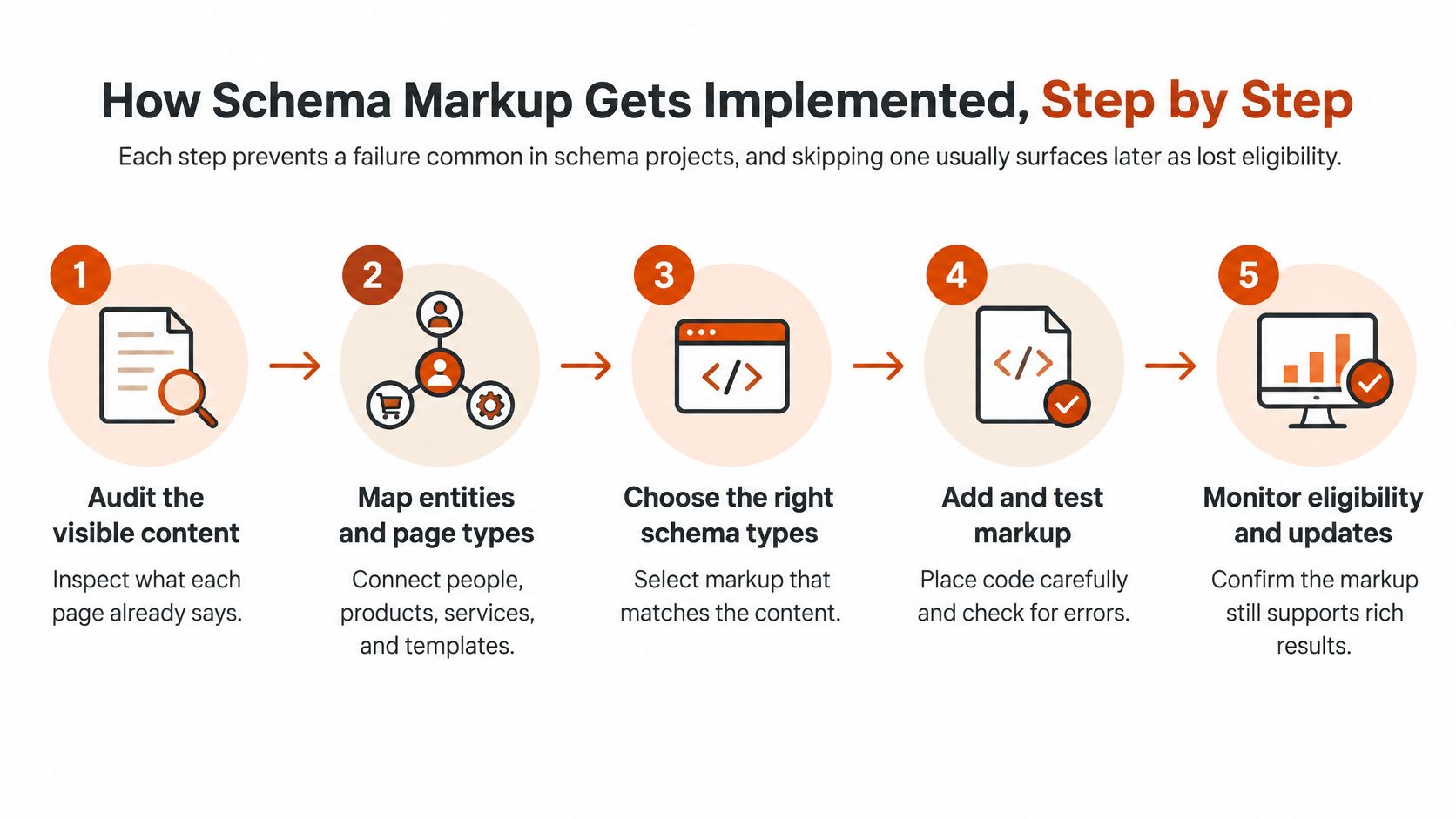
Google's dataset structured-data guidance is explicit that markup should describe information present and visible on the page, not hidden, inaccurate, or unrelated content. The same guidance says those pages must not be blocked by robots.txt, noindex, login walls, or other crawl barriers, and it points teams to URL Inspection plus a recrawl after deployment.
- Audit the visible content. List the entities each priority page already describes, so the markup can't outrun the copy.
- Map each entity to one canonical URL. Keep the same name, URL, and identifiers across Organization, Service, and Article so engines don't treat one firm as three.
- Write JSON-LD that mirrors the visible text. Leave out hidden modules, draft copy, and claims the page doesn't make.
- Deploy to page templates. A template fix covers every URL of that type. A single-page paste does not survive the next publish.
- Validate critical errors before release. A missing required property drops eligibility for that item.
- Inspect the live rendering and request a recrawl. Source code in the CMS isn't proof the crawler received the block.
- Refresh the XML sitemap. New and updated URLs need a current discovery path.
- Monitor status reports after release. Catch a template regression in days, not at the next quarterly review.
Discovery and re-indexing can take several days, so track impact by deployment cohort rather than assuming a result on day one. In our Fix step, key pages are rewritten to answer questions directly, structured data is added, and business details are made consistent across the web. Page rewrites and technical changes go onto the client's site or to their developer.
The client deliverable is a dated change log. Each row names the template, the markup it carries, and the date it went live. That log is what later reports compare against.
This short walkthrough shows how visible facts, markup, and validation fit together on a live page.
JSON-LD and the Two Validation Layers
Google recommends JSON-LD and also supports Microdata and RDFa. JSON-LD sits in its own block, so editors can change the visible layout without rewriting the facts, and developers can update the facts without touching the design. That separation is why it is easier to govern on a site that publishes every week.
Google's structured data policies are the reference for keeping markup aligned with eligible features. Treat validation as two layers that answer different questions.
Rich Results Test checks eligibility for Google's search features. A missing required property makes that item ineligible. Schema Markup Validator checks general Schema.org conformance across types and properties, which matters to any other system reading the same graph. Non-critical warnings don't block eligibility. They do thin out the entity description, so a logo, a sameAs link, or a date left blank is still worth fixing.
Why a single URL is the wrong sample
A CMS update or a change in server rendering can strip or corrupt the block on every page of a type while the URL someone bookmarked still looks fine. Validate the template, then crawl production URLs after deployment. Test representative page types before release, and route each validation report to the person who owns that template.
Practical rule: Select the most specific type the page supports, fill every relevant recommended property from visible content, and retest the template after any theme or rendering change.
Schema QA is an operating rhythm, not a launch-day screenshot. Continuous reports catch the silent removal that a one-time pass will never see.
Crawl Access and Sitemaps That Let Engines Read Markup
Markup on a page a crawler can't request does no work, however clean the JSON-LD is. Robots.txt is a root-level, UTF-8 plain-text file that controls which paths crawlers may request on that host. Google's robots.txt specification supports allow, disallow, and sitemap directives, and files are implicitly allowed unless a rule says otherwise.
Delivery checklist
- Publish robots.txt at the site root. A file in a subfolder isn't the file crawlers read first.
- Don't disallow any URL that carries structured data. A broad disallow on
/services/or/blog/hides the entities you just described. - Remove noindex and login walls from marked-up URLs. A page behind a gate isn't available to ordinary crawlers.
- Expose the XML sitemap as a fully qualified URL. The sitemap directive needs protocol and host. The file can live on a different host from robots.txt.
Google, Bing, and other major engines support that sitemap field, so one maintained directive improves discovery across several crawling systems. Our technical setup pairs schema with a clean sitemap, crawler access for AI bots, and an llms.txt file that summarizes the business. That summary gives engines a short orientation. It doesn't replace the structured facts on each page. Confirm the sitemap line resolves with a sitemap XML check before you treat discovery as done.
The five-minute test is simple. Open the robots file, confirm the sitemap line resolves to a live URL, and confirm priority pages aren't blocked.
Measuring Visibility Beyond Validation Passes
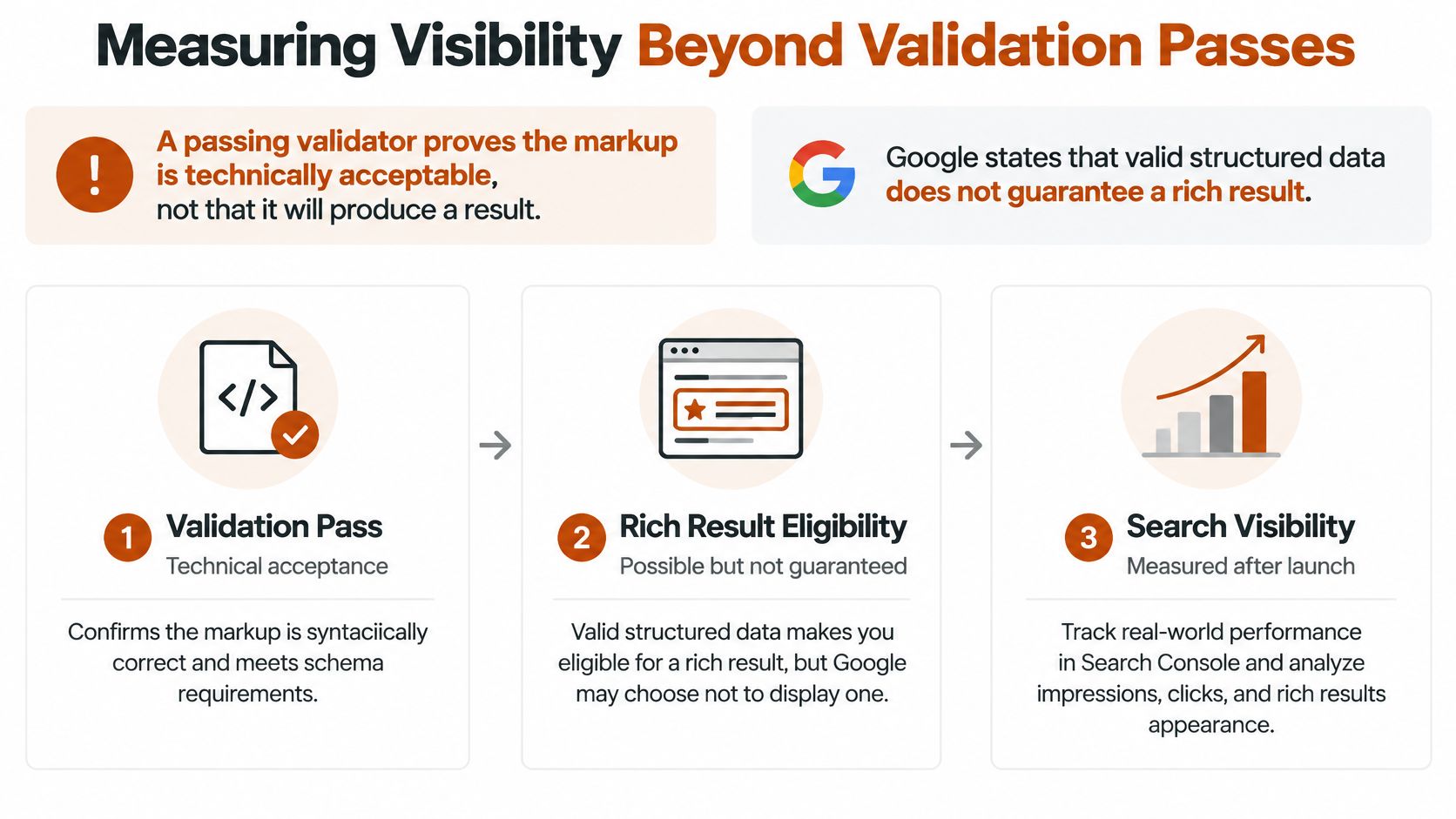
A passing validator confirms that markup parses. It does not prove that a search feature will appear or that AI assistants will cite the business. Google's organization structured-data documentation explains that valid markup does not guarantee a rich result, since display depends on other systems and eligibility conditions. Google's AI features also do not require special AI markup or new machine-readable files. Measure technical acceptance separately from visibility.
| Layer | Signal to track | Typical timing |
|---|---|---|
| Technical acceptance | Markup parses with no critical errors | Immediately after deployment |
| Crawl and index | Pages recrawled and sitemap processed | Several days after release |
| Search features | Impressions and clicks on eligible pages, by deployment cohort | Weeks after re-crawl |
| Entity understanding | Branded queries and accurate entity details | Weeks to months |
| AI answers | Engines name and describe the business accurately | Weeks after re-crawl |
These layers distinguish code quality from outcomes. Check whether the markup parses, whether crawlers fetch and index the pages, and whether eligible search features earn impressions and clicks. Then track whether engines recognize the brand and answer priority customer questions accurately. Use AI rank tracking to compare how often engines name the business over time.
Governance beats a longer type list
More schema types do not automatically improve visibility. Google has phased out support for structured data features over time, so a type that worked last year may no longer produce a search result. Map supported properties to accurate, visible content, test representative templates, and track search behavior alongside validation.
Results often develop in stages: engines describe the business accurately, name it for targeted questions, then mention it for related questions as authority builds. Correcting a wrong description may show after engines re-crawl the site, while authority from third-party mentions takes longer. Monthly reporting should show what engines say now, what changed, and what happens next. AnswerLion's reports are designed to be readable in five minutes.
Common Schema Errors and How to Fix Them
The failure that hurts most is quiet. A CMS update or a theme change removes the JSON-LD block from every page of a template, and nobody notices for weeks because the visible page still looks right.
| Symptom | Likely cause | Fix |
|---|---|---|
| Markup missing on every page of a template after an update | CMS or theme overwrote the JSON-LD block | Restore the template, then retest each page type |
| Rich result not appearing for a supported page | Required property left empty | Populate the property with a visible value |
| Markup describes content the page does not show | Schema added for hidden or outdated text | Mirror the visible text or remove the property |
| Validator flags a type as unsupported | Google has phased out support for the type | Remove the type and replace it with a supported one |
| Marked-up page missing from search | Robots or noindex rule on the URL | Remove the rule and request a recrawl |
Fix the template before the single URL
Restore the template first, then retest each page type, not only the URL someone happened to check. A single template fault usually spans every page built from it. Empty required fields in the CMS make a rich result ineligible, so fill each property with a visible value, never a placeholder like "TBD" or a zeroed rating.
Hidden or outdated facts get mirrored into the visible copy or removed from the block. Unsupported types come out of the code and, where a current type fits the page, get replaced. When a marked-up URL is missing from search, the cause is usually a crawl rule on that URL, which the robots and noindex check catches.
Template and property fixes take effect the day they are deployed and retested. Eligibility changes in search can take several days to show.
Record each fix in a repair log with the symptom, the fix, the date, and the page types affected. That log is what stops the same theme deploy from wiping the block twice.
Confirm Coverage and Choose a Plan
Bring a short list to any provider conversation, and don't sign off on a tier until each item has an owner.
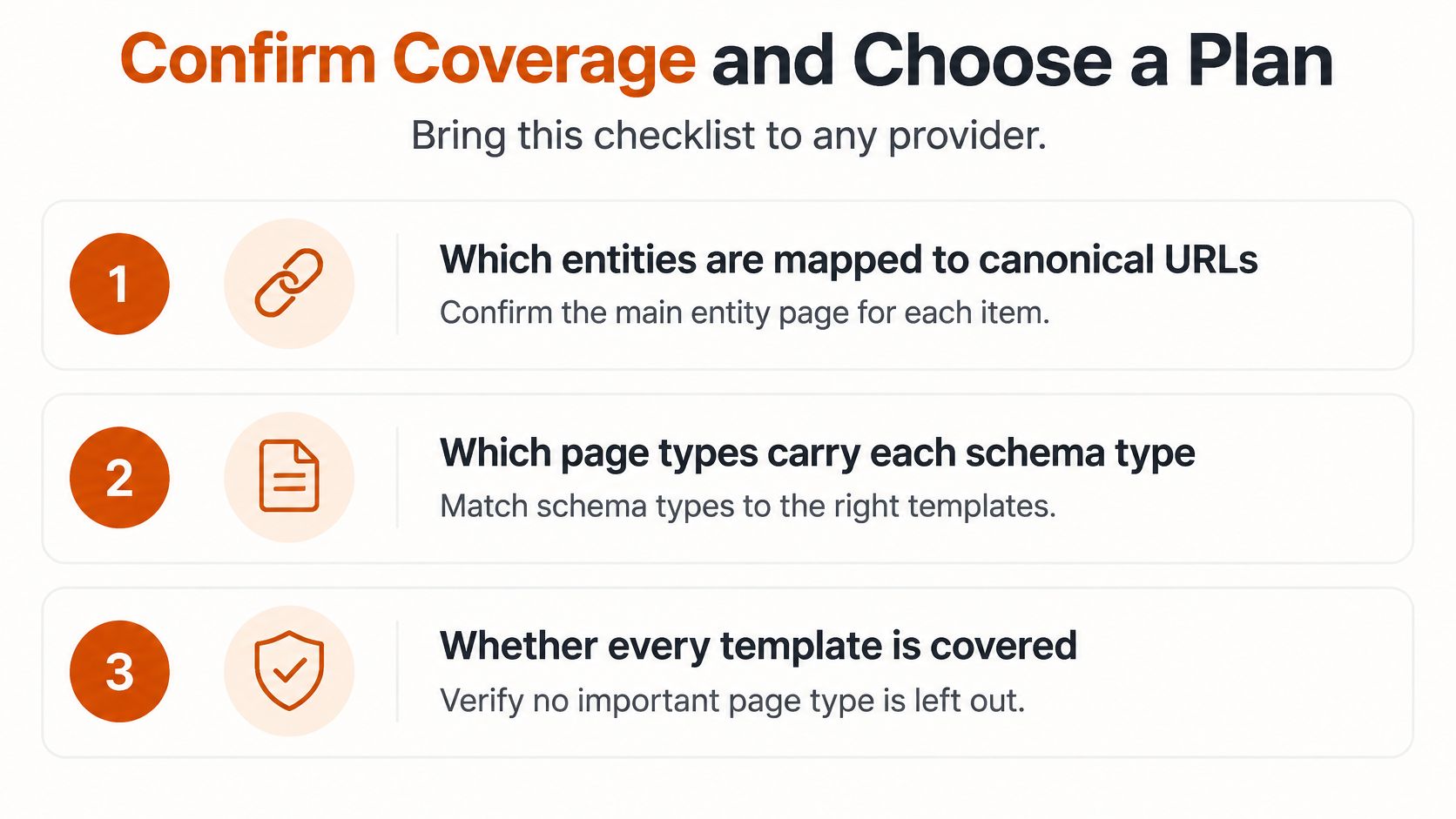
- Which entities map to canonical URLs. Company, services, locations, leaders, and key articles, each with one URL.
- Which page types carry each schema type. Organization, Service, FAQ, Article, and, where the site needs them, LocalBusiness and Product.
- Whether every template is validated before release. A sample URL isn't coverage.
- Whether crawl access is confirmed for each priority page. Robots, indexability, and a live sitemap URL.
- How results are measured past validation. By layer and by deployment cohort, including what AI answers say.
Match that scope to page volume and to the engines you need watched. AnswerLion plans line up like this.
| Plan | Pages each month | Schema coverage | AI engines monitored | Price |
|---|---|---|---|---|
| Starter | 1-2 pages | Organization, FAQ, crawler access, llms.txt | Google AI Overviews | Set in the proposal after the audit |
| Visibility | 2-4 pages | Organization, Service, FAQ | 2 AI engines | $288 per week for 12 weeks, then $577 per week |
| Growth | 6-10 pages | Adds LocalBusiness, Product, Article | 4+ AI engines including ChatGPT, Perplexity, Claude | Set in the proposal after the audit |
Starter includes a full AEO audit in the first month, one to two pages rewritten or published each month, Organization and FAQ schema, crawler access, llms.txt, monitoring on Google AI Overviews, and a monthly report readable in five minutes. Visibility includes everything in Starter, plus two to four pages a month, core Organization, Service, and FAQ schema, monitoring across two AI engines, and listing and profile clean-up. It costs $288 per week for the first 12 weeks, then $577 per week.
Growth fits multi-location and multi-service businesses. It includes everything in Visibility, plus six to ten pages a month, expanded LocalBusiness, Product, and Article schema, authority building across directories, publications, and review sites, and monitoring across four or more engines including ChatGPT, Perplexity, Claude, and Google AI Overviews, with biweekly reporting and a monthly strategy call.
Book the baseline audit first. Then request the entity map and the template validation report before you commit to a tier.
AnswerLion helps businesses get named and described accurately by AI assistants, and structured data is part of that work, from Organization, Service, FAQ, and Article markup through crawl access and ongoing visibility reports. If you want a baseline of how engines describe your company today, and a clear plan for the pages and templates to fix first, visit AnswerLion.